
Run your whole business on one platform.
Sell, market, serve customers, deliver work and manage the books in one place, with a personal hub alongside so your day lives there too.
30 days free. No credit card required.
Everything that runs a business, connected
Stop stitching together separate tools. One record of each customer flows from first contact to sale, service, and the books.
Win and keep customers
Contacts, pipeline, estimates, and contracts with renewals, all in one view of every relationship.
Market and get found
Campaigns, email, lead capture, and a blog, plus website scans and rankings that show how you appear in search.
Sell online
Products, checkout, subscriptions, and payments, tied to the customer record.
Serve customers
A branded customer portal with class sign-ups, shared files, support tickets, and a help center.
Run the books
Money, receipts, budgets, and goals, with tax-time preparation built in.
Run your day and your team
A daily view of what's due, team scheduling and time cards, and a personal hub for life outside work.
Two short videos, one picture
A minute or two each: how one platform replaces the stack of separate tools, and how a website visit becomes tracked revenue.
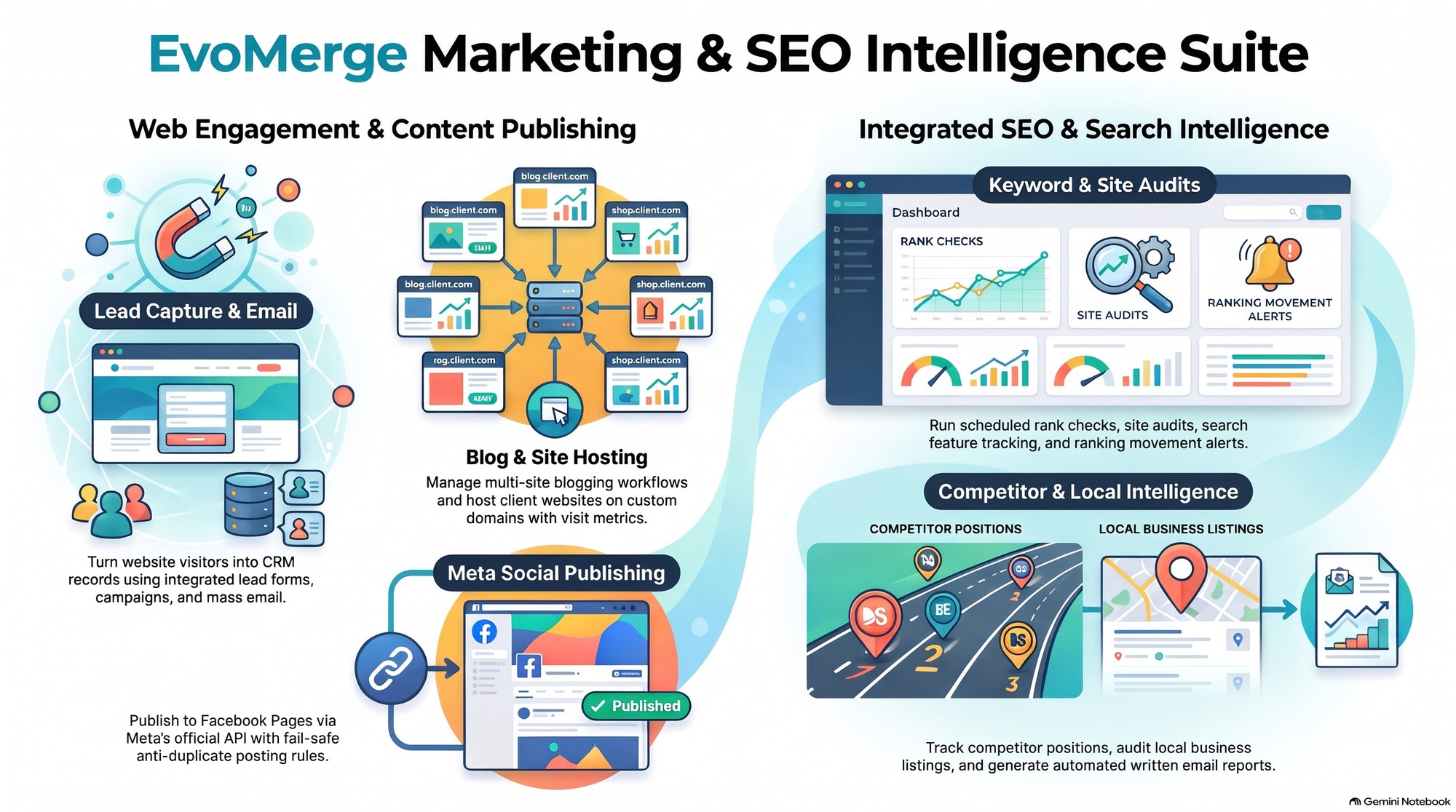
Built for how your business works
Add industry tools on top of the core platform when they fit. Leave them off when they don't.
Contractors and builders
Keep jobs, field work, and paperwork on track from start to closeout, including inspections, daily logs, and change orders.
Restaurants and food service
Run the floor and the kitchen alongside the rest of the business: tables, tickets, waitlist, and ingredient stock.
Software and product teams
Plan, build, and ship work with epics, user stories, and bugs in the same place you serve customers.
Up and running in your first session
There's nothing to install and no sales call to sit through. Sign up and a guided Getting Started hub walks you through your first steps.
Create your account
Sign up in a minute. No credit card, and 30 days to try everything.
Bring in what matters
Add your clients, accounts, and products so you're working with real data from day one.
Grow into the rest
Turn on marketing, your portal, and industry tools as your business needs them.
What's inside each part of the platform
A pipeline built on real accounts, not a spreadsheet
Companies, contacts, and deals in one place, with the activity history to back it up. Every call, email, and task is tied to its account instead of scattered across inboxes.
Accounts & Pipeline
Companies, contacts, and deals staged through your own pipeline, with tasks, activities, and a full history on every record.
Estimates, Orders & Invoicing
Line-item estimates with per-item pricing, converted to orders and invoices with PDF export and partial-payment tracking. You don't need a separate billing tool.
Mass Email & Campaigns
Segment by company or contact, send individually (not a visible recipient list), track opens and clicks, and run scheduled Campaigns with RSVP tracking.
Phases or sprints, whichever fits the team
A team running a build-out and a team running two-week sprints don't work the same way, so they shouldn't have to share a board.
Phases, Timeline & Health
Phases and workstreams on a live Gantt-style timeline. Timeline and Budget Health indicators show a slipping project early, before it turns into a surprise.
Agile Delivery
Epics down through Features and User Stories on a drag-and-drop Sprint Kanban board, with Defects and shared acceptance criteria alongside.
Resourcing
Staff a project from your own team, with a role, rate, and cost for each assignment. Those numbers feed straight into the project budget.
A private, branded space for your customers
Customers get their own sign-in, tied to a real account on your side. They never see the rest of your CRM.
Self-Service Portal
A dashboard for their own account, behind their own login. It shows family members, open balance, unread messages, and the latest announcement.
Billing, Announcements & Messages
Customers see their own invoices, read the notices you post, and message your staff directly. It's one running conversation instead of a trail of emails.
Staff Controls
Give any existing contact portal access, read and reply to their messages, or sign in as them to see exactly what they see. That last one is there for support.
From what you billed to what you actually kept
Business billing and personal-style financial tracking, both built on real transaction data instead of a spreadsheet nobody trusts by Q3.
Billing Operations
Estimate through order, invoice, and payment, with discounts, PDF export, subscriptions that send renewal invoices automatically, and income and expense tracking tied to real orders.
Accounts, Tax Lines & Budgets
Bank and card accounts with categorized transactions, automatic tax-line mapping, depreciation schedules for fixed assets, and a dashboard that works toward a filing-ready picture.
Classes, registration, and age eligibility, handled for you
Publish a class to your portal's catalog and customers register their own family members. There's no paper sign-up sheet and no spreadsheet of who's allowed in which session.
Class Catalog & Registration
Mark any product as registerable, add a schedule, instructor, and price, and it appears in your portal's catalog with a one-click Register button.
Age Eligibility, Enforced
Set a minimum and maximum age on a class, and registration checks each family member's date of birth automatically. The check runs on the server, so it's more than a hint on the form.
Time doesn't sit in its own silo. It feeds everything else
A timesheet that isn't connected to anything is just a form. In EvoMerge, logged time links a sale to what it cost to deliver.
Weekly Time Entry
A simple grid limited to what a person is staffed on, so nobody is left guessing how to fill in a blank week.
Approvals
Time approvers can correct or log hours directly. A submitted week is locked against changes until it's reviewed.
Cost Rollups
Each person's internal cost rate turns logged hours into real project cost, which feeds straight into that project's Budget Health.
The same data, already rolled up
Standard dashboards you don't have to build yourself, with drill-through from a chart to the records behind it.
Live Dashboards
Pipeline value, deal stages, project health, revenue, and referrals, charted and current instead of a monthly export.
Drill Through to the Record
Click a bar or a stat tile and land on the list of deals, invoices, or projects behind it.
Works with Claude
Connect EvoMerge to Claude and get things done by asking in plain language: "What's on my plate today?" or "Log my call with Acme and set a follow-up for Friday." Claude works with your own permissions, so it only sees what you can see.
See it on your own business
30 days free, no credit card required. Set up your company, add your first clients, and decide if it fits before anything is asked of you. Prefer to talk first? Call us at 904-395-5138. We're glad to.